 SimpleListen
Listen to your ChatGPT research on the way there.
The research is done. You can catch up away from the screen.
Ask ChatGPT to plan three days in Kyoto, compare the tools you are considering, or explain a topic you want to learn. Send the finished answer to SimpleListen and listen before your flight, on a walk, or during your commute.
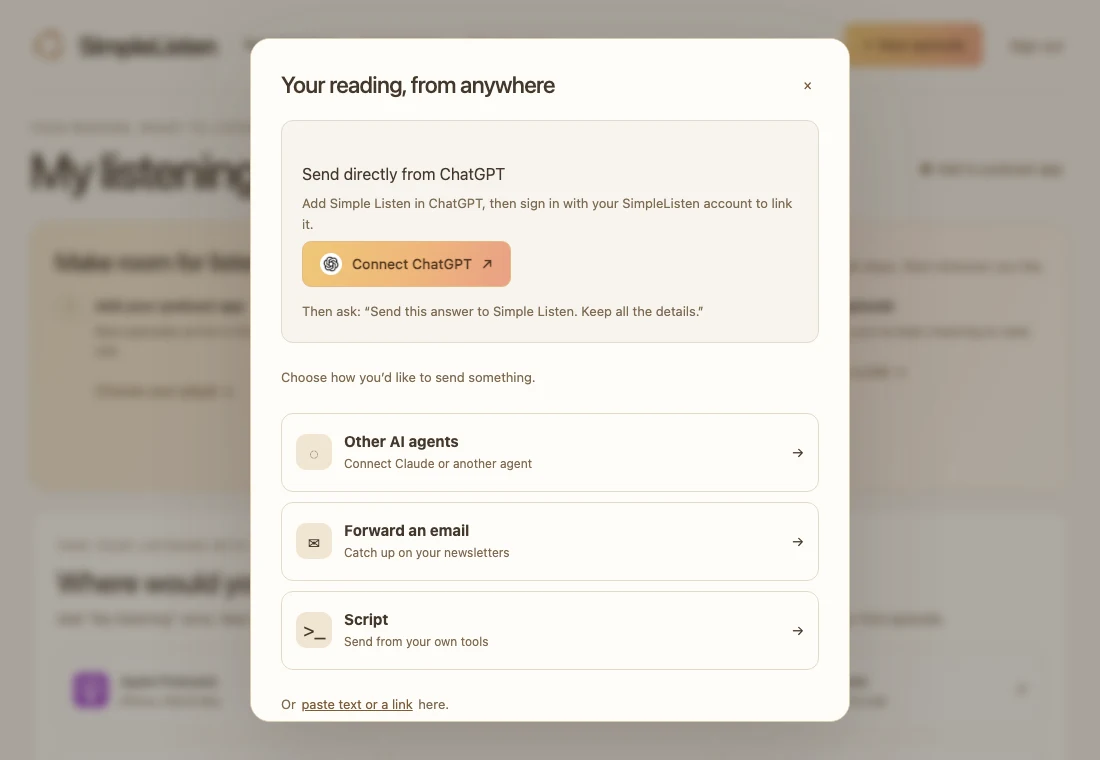
 Connect ChatGPT (opens in a new tab)
How it works
- 1
Connect Simple Listen in ChatGPT
Open the Simple Listen plugin using the Connect ChatGPT button. Add it in ChatGPT, then sign in with your SimpleListen account to authorize the connection. You can create an account during sign-in if you are new.
- 2
Send the listening script
Ask ChatGPT for the research or answer you need. Then ask: Send this answer to Simple Listen for listening. Keep all the details and the original language. ChatGPT prepares and submits the script directly.
- 3
Listen through your podcast feed
Choose a feed and voice. When narration is complete, listen in the web player or refresh your subscribed feed in a compatible podcast app.
A library and a bookshop
The answer
A library lends books from a shared collection. A bookshop sells books for people to keep. Both can help you discover something to read, but you use them differently: borrowing is temporary, while buying gives you a copy of your own.

If you want to explore a new author, borrowing can be a useful first step. If you want to annotate a book or return to it often, you may prefer to buy a copy.
Hear the complete example
Both paragraphs are kept in full.
Cedar voice · AI narration · Written for this guide
Read the exact narration script
A library lends books from a shared collection. A bookshop sells books for people to keep. Both can help you discover something to read, but you use them differently: borrowing is temporary, while buying gives you a copy of your own. If you want to explore a new author, borrowing can be a useful first step. If you want to annotate a book or return to it often, you may prefer to buy a copy.
Read aloud now, or keep it as an episode
Your assistant's own read-aloud option can be enough for a quick listen. SimpleListen is useful when you want finished answers in the same listening queue as your articles, with a saved episode and a feed for your podcast player. The example above is an illustrative answer written for this guide, not a live ChatGPT conversation.
| Method | What it needs |
|---|---|
| Copy and paste | Works with text from any assistant. No direct connection required. |
| Send from ChatGPT | Add the Simple Listen plugin in ChatGPT and link your SimpleListen account. |
| Prepare incoming reading | An authorized MCP Events subscription in a compatible host. Connecting tools alone does not enable this. |
If you also forward reading, see how email preparation works. Use the words-to-minutes calculator to plan the listen.
A prompt for a full listening script
Try: Rewrite this answer for spoken narration. Preserve its details, qualifications and original language. Turn headings and bullet points into clear spoken transitions. Describe relevant tables and spell out abbreviations when needed. Do not summarize unless I ask.
Review the script before submitting it, especially if it contains financial figures, medical information or technical instructions. Narration preserves the supplied content; it does not make an answer accurate or replace its source citations.
Send directly from ChatGPT
The Simple Listen: Read Aloud plugin is available in ChatGPT. Use Connect ChatGPT to open its listing and link your SimpleListen account. Once connected, ask ChatGPT to send a finished answer or article for listening without copying it between apps.
You can also paste a prepared script into the website. Other compatible AI clients can connect through MCP, and scripts can use the CLI or API. Host and workspace settings determine which connection features are available.
Let an agent prepare forwarded reading
In compatible clients, an authorized MCP Events subscription can ask your agent to prepare an incoming article or email for voice. Set up the subscription before choosing agent preparation for a feed.
An episode routed to an agent waits until the script returns or you cancel it. There is no timed switch to automatic narration. If you want immediate cleaned narration instead, use the feed’s cleaned-text mode.
A SimpleListen guide by Vladimir Haltakov. Updated . See the privacy policy and terms for details.
Frequently asked questions
Does SimpleListen answer ChatGPT prompts itself?
No. Your agent researches and answers the question, then supplies the finished script. SimpleListen generates narration and maintains the podcast feed.
Do I need a ChatGPT plugin?
The Simple Listen plugin lets ChatGPT send answers directly to your feed after you link your SimpleListen account. You can also copy a script into the website without connecting the plugin.
Will the agent summarize my source automatically?
The intended default is full content adapted for listening. Ask explicitly for a summary if you want one. Review your agent’s script before narration when fidelity matters.